How can I monitor long running queries in my Snowflake Account?
Last updated: December 9, 2025
Most monitors in SELECT are based on the data we extract from your Snowflake account once per day. Anything you'd like to monitor on an intra-day basis can be done with Custom SQL Monitors. These fire inside of your Snowflake account when triggered.
Why is this different from other Custom SQL monitors?
Monitoring queries that are still running has a special complexity: the Account Usage views in Snowflake will not show queries that haven't completed yet. To find "long running queries still running", we need to use Snowflake's query_history() table function instead.
Required Permissions
By default, the query_history() table function only returns queries run by the calling user or queries that the user's role has access to. Since the SELECT service user runs these monitors, you'll only see queries that SELECT itself has run, not your team's queries.
To monitor queries across all users, grant the SELECT role one of the following:
Option 1: Account-level privilege (recommended)
This grants visibility into all running queries across the account:
GRANT MONITOR EXECUTION ON ACCOUNT TO ROLE SELECT_ROLE;It's worth noting that SELECT already has access to all historical queries in your account through the account_usage.query_history view so this permission isn't giving SELECT access to any net new information. The permission just allows the data to also be retrieved via information_schema.query_history for more real time reporting.
Option 2: Warehouse-level privileges
If you prefer more granular control, grant MONITOR on each warehouse you want to observe:
GRANT MONITOR ON WAREHOUSE my_warehouse TO ROLE SELECT_ROLE;
GRANT MONITOR ON WAREHOUSE another_warehouse TO ROLE SELECT_ROLE;
-- Repeat for each warehouse
Note: With Option 2, the monitor will only capture long-running queries on warehouses where MONITOR has been granted.
Example Query
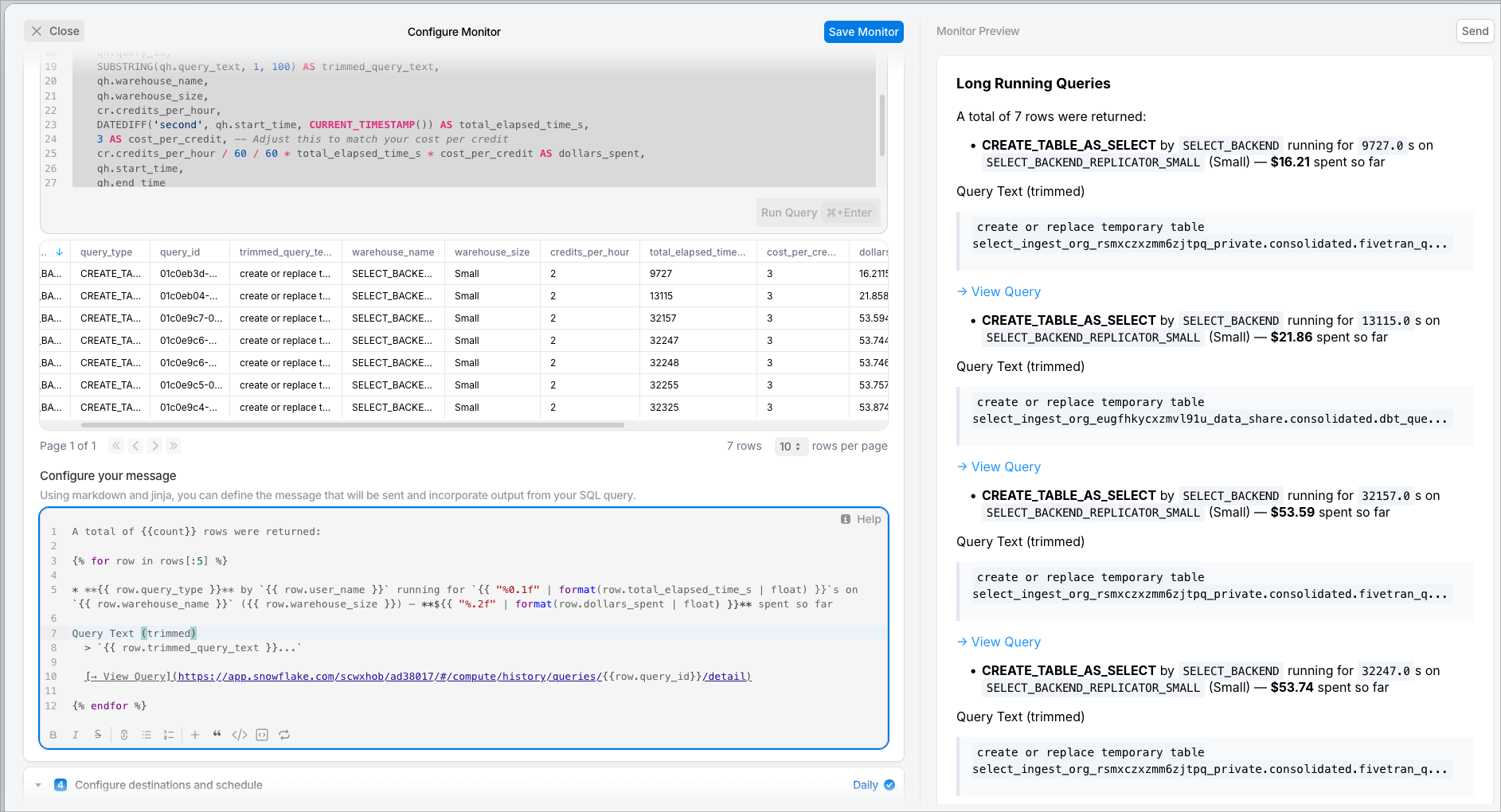
Here's a SQL query you can use in a Custom SQL Monitor to capture currently running long queries, along with estimated credit usage and cost:
WITH credit_rate AS (
    SELECT column1 AS warehouse_size, column2 AS credits_per_hour
    FROM VALUES
        ('X-Small', 1),
        ('Small', 2),
        ('Medium', 4),
        ('Large', 8),
        ('X-Large', 16),
        ('2X-Large', 32),
        ('3X-Large', 64),
        ('4X-Large', 128),
        ('5X-Large', 256),
        ('6X-Large', 512)
)
SELECT
    qh.user_name,
    qh.query_type,
    qh.query_id,
    SUBSTRING(qh.query_text, 1, 100) AS trimmed_query_text,
    qh.warehouse_name,
    qh.warehouse_size,
    cr.credits_per_hour,
    DATEDIFF('second', qh.start_time, CURRENT_TIMESTAMP()) AS total_elapsed_time_s,
    3 AS cost_per_credit, -- Adjust this to match your cost per credit
    cr.credits_per_hour / 60 / 60 * total_elapsed_time_s * cost_per_credit AS dollars_spent,
    qh.start_time,
    qh.end_time
FROM TABLE(SNOWFLAKE.INFORMATION_SCHEMA.QUERY_HISTORY(RESULT_LIMIT => 100)) qh
LEFT JOIN credit_rate cr ON qh.warehouse_size = cr.warehouse_size
WHERE qh.execution_status = 'RUNNING'
  AND DATEDIFF('second', qh.start_time, CURRENT_TIMESTAMP()) > 3600; -- 1 hour threshold
Customize for your environment:
Adjust
cost_per_creditto match your contract rateChange the
3600second threshold (1 hour) to your desired alert durationIncrease
RESULT_LIMITif you have high query concurrency
Important: Understanding the Table Function Behavior
The query_history() table function has some quirks you need to understand to use it effectively.
Result Limit
The function has a maximum of 10,000 rows it can return (default is 100). If you have high query concurrency, you may not get all running queries.
Filtering happens AFTER the result limit
This is the gotcha that trips people up: the WHERE clause filters results AFTER the table function returns its rows.
The function first returns up to RESULT_LIMIT rows (sorted by most recent end time), then your WHERE clause filters that set. This means if you filter by a specific user:
sql
SELECT *
FROM TABLE(SNOWFLAKE.INFORMATION_SCHEMA.QUERY_HISTORY(RESULT_LIMIT => 100))
WHERE user_name = 'SOME_USER'
...and that user's queries aren't in the first 100 rows returned, you'll get zero results even though they have running queries.
Pre-filtering with function parameters
To filter more reliably, use parameters inside the function call rather than the WHERE clause. These parameters are applied before the result limit, so you get the rows you actually want. But these pre-filtering options are limited.
The base QUERY_HISTORY() function supports these parameters:
sql
QUERY_HISTORY(
  END_TIME_RANGE_START => <timestamp>,  -- Only queries ending after this time
  END_TIME_RANGE_END => <timestamp>,    -- Only queries ending before this time
  RESULT_LIMIT => <number>              -- Max rows (default 100, max 10000)
)
Alternative functions for filtering by user, warehouse, or session
If you need to pre-filter by something other than time, Snowflake provides variant functions:
QUERY_HISTORY_BY_USER()— Pre-filters by user + time rangeQUERY_HISTORY_BY_WAREHOUSE()— Pre-filters by warehouse + time rangeQUERY_HISTORY_BY_SESSION()— Pre-filters by session + time range
Suggested Jinja template
You can use this Jinja template in the Monitor but replace the Snowflake account and org identifiers with your own. Here’s an example from our account: https://app.snowflake.com/scwxhob/ad38017/#/compute/history/queries/01ba8ed5-0000-be68-0000-3de928e6403a/detail
The structure is:
https://app.snowflake.com/<organization_name>/<account_id>/#/compute/history/queries/<query_id>/detail
A total of {{count}} rows were returned:

{% for row in rows[:5] %}

* **{{ row.query_type }}** by `{{ row.user_name }}` running for `{{ "%0.1f" | format(row.total_elapsed_time_s | float) }}`s on `{{ row.warehouse_name }}` ({{ row.warehouse_size }}) — **${{ "%.2f" | format(row.dollars_spent | float) }}** spent so far

Query Text (trimmed)
  > `{{ row.trimmed_query_text }}...`

  [→ View Query](https://app.snowflake.com/scwxhob/ad38017/#/compute/history/queries/{{row.query_id}}/detail)

{% endfor %}
When the Monitor arrives in Slack it will look like this:
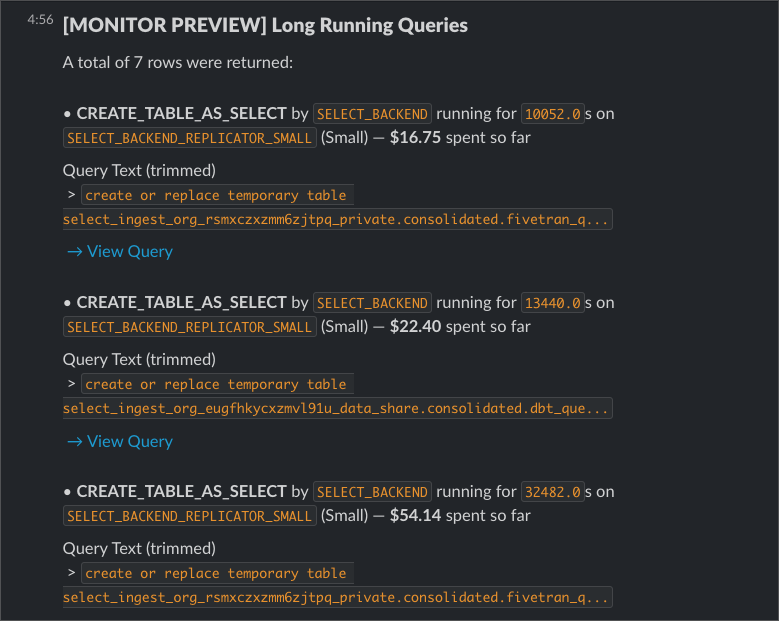
The links will bring you right to the query in Snowflake!
Here's what it looks like in the SELECT UI: